

PickPix Tot Overview
Dear Parents,
We created PickPix Tot on the iPhone, iPad, iPod Touch, and now Android (Froyo or later) to entertain and teach our daughter, Esther (that’s her in the icon). It makes her laugh and she gets to learn about pets, utensils, foods, and other everyday things. We want to share it with other parents and kids.
Filled with beautiful, professional, high-quality photographs depicting commonly encountered objects, living things, and phenomena, lovingly described by a real mother, you and your child will have fun going through the cards and playing the “Pick the Picture” game. And your child will have fun discovering how to interact with the iPhone and iPad.
Our latest version (2.0), released on January 21, 2013 (click here to see what's new), has 114 words. We take our users very seriously and updated our app from their valuable feedback.
If you have any questions or suggestions regarding our app, please email us at ken[at]crimsonhammer.com. And don't forget to check out our other apps, PickPix ABC and PickPix Chinese!
Thank you for your interest in our app!
Sincerely,
Ken and Lisa
We created PickPix Tot on the iPhone, iPad, iPod Touch, and now Android (Froyo or later) to entertain and teach our daughter, Esther (that’s her in the icon). It makes her laugh and she gets to learn about pets, utensils, foods, and other everyday things. We want to share it with other parents and kids.
Filled with beautiful, professional, high-quality photographs depicting commonly encountered objects, living things, and phenomena, lovingly described by a real mother, you and your child will have fun going through the cards and playing the “Pick the Picture” game. And your child will have fun discovering how to interact with the iPhone and iPad.
Our latest version (2.0), released on January 21, 2013 (click here to see what's new), has 114 words. We take our users very seriously and updated our app from their valuable feedback.
If you have any questions or suggestions regarding our app, please email us at ken[at]crimsonhammer.com. And don't forget to check out our other apps, PickPix ABC and PickPix Chinese!
Thank you for your interest in our app!
Sincerely,
Ken and Lisa
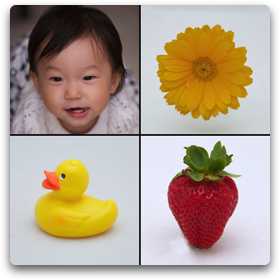




PickPix Tot is designed for children aged 9 months to 3 years.
Beautiful photographs and voice narration help children learn words. Younger children will be engaged by the PickPix Tot Picture Cards, while older children will love the challenging PickPix Tot Game.
Little ones love to bang on the screen of the iPhone/iPad. Traditional user interface designs using a “Done” or “Back” button often get triggered accidentally. To prevent this, we made triple-tap the gesture to go back to the start screen and double-tap with two fingers the gesture to start and stop a slideshow.
See Cards and Play Game
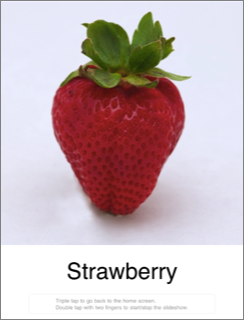
The PickPix Tot Picture Cards feature a slideshow of vivid images, each accompanied by the printed name of an object, and voice narration announcing the object, as well as additional information regarding the object. The additional information narration is designed as a memory aid for children and can be turned off as an option in Settings (see Simple English Mode below).
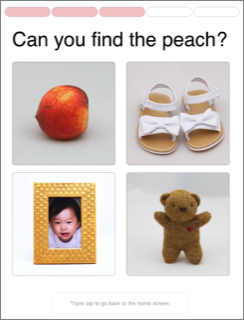
The PickPix Tot Game features a series of narrated screens asking the child player to find the appropriate picture. At the top of each screen is a progress bar showing the number of questions answered in the five-question series.
It is similar to a Japanese technique for evaluating the cognitive development of toddlers.
It is similar to a Japanese technique for evaluating the cognitive development of toddlers.
User Interface: Designed for Little Ones and Parents
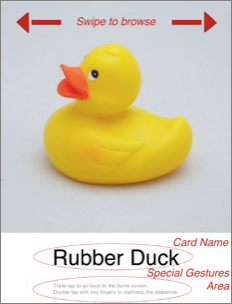
Little ones love to bang on the screen of the iPhone/iPad. Traditional user interface designs using a “Done” or “Back” button often get triggered accidentally.
To prevent this, we created a special gestures area at the bottom of the card:
Swipe left or swipe right on the picture to browse through the cards.
Tap on the card name to hear the name and description again.
To prevent this, we created a special gestures area at the bottom of the card:
- Triple-tap in this area to go back to the start screen
- Double-tap with two fingers to start and stop a slideshow.
Swipe left or swipe right on the picture to browse through the cards.
Tap on the card name to hear the name and description again.

The slide show icon shows up when you have successfully activated the slide show feature by double-tapping with two fingers.
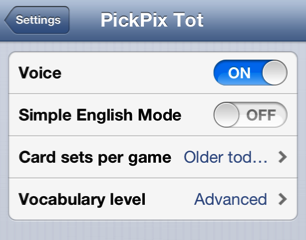
You can turn the voice feature on or off.
You can set the number of cards in a game (see below).
And if you prefer no detailed description of each object, you can turn on Simple English Mode.
We added the "Vocabulary level" setting in version 2.0. As we increased our number of words, we found the need to divide them into "Basic" and "Advanced." See two images below for more details.
You can set the number of cards in a game (see below).
And if you prefer no detailed description of each object, you can turn on Simple English Mode.
We added the "Vocabulary level" setting in version 2.0. As we increased our number of words, we found the need to divide them into "Basic" and "Advanced." See two images below for more details.
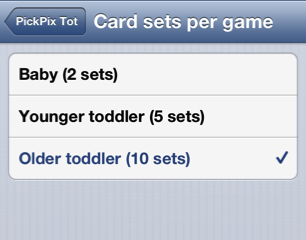
To account for your child's individual attention span, we designed the game so that you can alter the number of card sets shown per game.
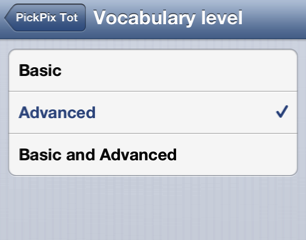
To account for your child's need for different levels of vocabulary, we implemented the "Vocabulary level" setting. For example, a basic word would be "banana" and an advanced word would be "skyscraper." You can choose to have both "Basic and Advanced," just "Basic," or just "Advanced."
Now available
for iOS, Nook, Android, and Amazon Kindle Fire.
for iOS, Nook, Android, and Amazon Kindle Fire.




Thanks to Animal-Sounds.org for allowing us to use some of the animal sounds in our app.